
Transact Mobile Ordering
Transact Campus Inc.Food & Drink
4.61.29K Reviews
- Version
- 2026.3
- Installs
- 100.00K
- Age Rating
- Everyone
Screenshots
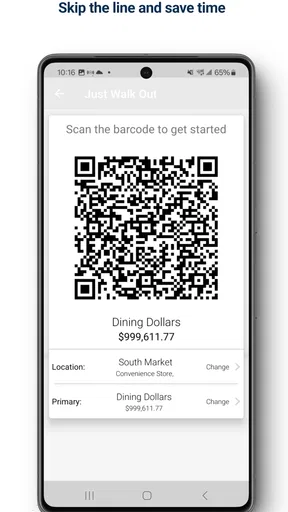
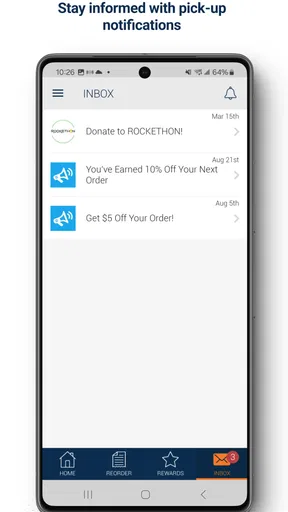
Our Review of Transact Mobile Ordering
 Analysis by Appyee
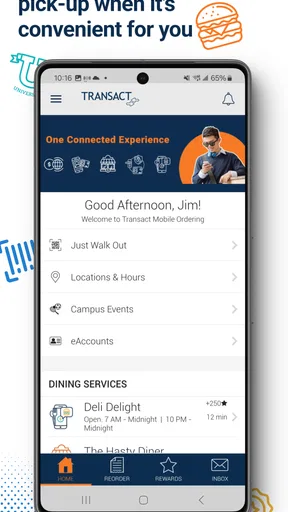
I found Transact Mobile Ordering most useful as a focused campus food tool rather than as a general restaurant app. It is built around a simple task: choose food through a participating campus ordering setup, pay in the app, and collect it without standing in the usual queue. That narrow purpose is also its main strength. When I am rushing between classes, work, or an appointment, removing even a small amount of waiting can make the difference between eating properly and skipping a meal.
The app comes from Transact Campus Inc. and sits in the Food & Drink category. It is free to install, aimed at Everyone, and supports devices running at least iOS or Android version 10, depending on the platform you use. Its current version is 2026.3, while the app first appeared on September 25, 2018. Those details make it feel like an established service rather than a brand-new experiment, although the real usefulness still depends heavily on whether the campus locations you need are available through it.
My overall impression is positive but practical: this is not an app I would download for entertainment or broad restaurant discovery. I would use it when my school, university, or campus workplace already relies on Transact ordering. In that situation, the convenience is easy to understand. Outside that setting, there is little reason to choose it over a familiar restaurant delivery or pickup service.
How the cost affects the app’s value
I see the free-to-install model as a low-risk way to test whether Transact ordering fits your campus routine, rather than a guarantee that every meal will cost less or take less time. In this section, I’d weigh that straightforward access against the practical value you get from the venues you actually use. The next part turns from cost to the specific moments when placing an order ahead helps most.
Free access makes the decision straightforward
The app itself is free, which removes the biggest barrier to trying it. I do not have to commit to a subscription or pay simply to see whether the ordering workflow fits my routine. That matters for students and staff who may only need mobile ordering on certain days, such as busy exam periods, long shifts, or days when several campus venues are crowded.
Free access does not automatically mean every order costs nothing, of course. The food and drinks selected through the service still belong to the relevant campus venue, and the final amount depends on what I choose there. The useful distinction is that the app does not require a separate purchase just to provide its ordering interface. I can judge its convenience against the normal in-person process instead of calculating whether another recurring app charge is worthwhile.
I also appreciate that the app’s value is easy to measure personally. If ordering ahead saves me from missing a lecture or arriving late to work, the free app has earned a place on my phone. If the venue is usually quiet and the counter process is already fast, the benefit is much smaller. This is a case where the right question is not “Is the app impressive?” but “How often does it remove a problem I actually have?”
What free does and does not promise
A free app can still involve practical limitations. It does not guarantee that every campus dining location will appear, that every item will always be available, or that an order will be ready at exactly the moment I expect. Those details are connected to the participating venue and its day-to-day operation, not just to the app on my phone.
That is why I would not treat the free download as a replacement for checking the pickup situation. If I am ordering before a short break, I would allow extra time rather than planning a perfect minute-by-minute handoff. The app can reduce the ordering step, but it cannot remove kitchen preparation, crowded counters, sold-out items, or a sudden change in campus traffic.
The value is strongest when I use it as a planning aid. I can make the selection before reaching the busiest part of the day, then collect it during a realistic window. The free price makes this low-risk, but the time saved comes from using the workflow sensibly, not from expecting the app to solve every delay.
What the ordering experience is good at
For me, the strongest part of the workflow is moving the decision out of the queue: I can choose and pay before reaching the counter, then focus on getting to the right pickup point. That works best with familiar, straightforward orders and a break short enough that every minute matters. The following section looks at where that convenience can still run into everyday friction.
A useful alternative to the physical queue
The central experience is refreshingly clear. Instead of walking to a dining counter, waiting to decide, and then handling payment while a line grows behind me, I can place the order through the mobile interface and approach the venue for pickup. That separation between choosing and collecting is the reason I would recommend it to someone with a compressed schedule.
In a realistic weekday scenario, I might have ten minutes between a seminar and a lab. I can look through the available campus choices before leaving the first building, submit an order, and use the walk to reach the pickup point. I still need to collect it, but I am not spending the whole break studying a menu at the counter. If the venue is busy, that change in timing can be more valuable than any individual interface detail.
There is also a small mental benefit. Ordering before arriving lets me make a decision away from the pressure of a line. I can consider the menu and total more calmly, which is helpful when I am tired or distracted. For repeat users, the routine can become almost automatic: check what is available, choose a familiar meal, place the order, and head to the right collection point.
Why the campus setting matters
This is not simply a generic takeaway app with a campus-themed name. Its usefulness comes from fitting into an institutional food environment where people often eat at predictable locations and have limited time between obligations. A student may visit the same café several times a week, while a staff member may need a dependable lunch option without leaving campus.
That context makes the app more practical than a broad restaurant marketplace for certain users. A delivery-focused service may show more restaurants, but it can be excessive when I only need food from the building I am already visiting. Transact Mobile Ordering is better suited to short-distance pickup and routine campus meals than to discovering somewhere new across town.
At the same time, this focus narrows its usefulness. If I live off campus, rarely visit a participating institution, or want restaurant delivery to my home, I would get more from an app designed around local discovery and delivery. The simpler campus workflow is an advantage only when it matches my daily surroundings.
Small workflow choices that make a difference
One of the more useful habits is to browse before I become hungry. A few minutes of advance planning gives me time to notice which venue makes sense for my route and whether the order will fit my break. Waiting until I am already standing outside a crowded dining hall removes much of the advantage of mobile ordering.
I would also keep the pickup location in mind rather than assuming the closest-looking venue is the most convenient. On a large campus, a short walk can become a meaningful delay if I am moving between buildings. Choosing the location that matches my next destination is often smarter than choosing the one with the most familiar name.
Another practical tip is to treat the app as a way to reduce decision time, not as permission to over-plan. If I repeatedly reorder complicated meals while rushing, the extra choices can cancel out the convenience. A small set of reliable options is likely to work better during a short break, while more careful browsing makes sense when I have time.
What I would check before relying on it
Before making the app part of my routine, I would confirm that my campus dining locations are actually represented and that the pickup process is clear at those venues. This is the most important check because the app’s benefit depends on local participation. A polished ordering screen is not useful if the café I need does not appear when I am ready to eat.
I would also try one low-pressure order first. That gives me a chance to learn where collection happens, how much time the venue usually needs, and whether the app’s menu matches what I normally buy. Testing it on a day without a tight appointment is better than discovering the workflow for the first time during a five-minute break.
For payment, I would review the final screen carefully before submitting. Mobile ordering makes it easy to move quickly, and that speed can encourage careless choices. Checking the selected venue, items, and total is a simple step that prevents an avoidable pickup problem.
Trade-offs I noticed in everyday use
I find the main trade-off is that the app can streamline ordering without controlling preparation, availability, or the handoff at a busy campus venue. A little planning helps, but the best approach depends on whether I need a quick repeat order or have questions that are better handled face to face. Next, I’ll narrow down which routines are most likely to make the app worthwhile.
Convenience depends on the venue, not just the software
The biggest limitation is that an ordering app cannot control the entire food operation behind it. A venue may be busy, short on a particular item, or slower than usual. Mobile ordering changes how I submit the request, but it does not guarantee a frictionless meal from start to finish.
This matters because the promise of skipping a queue can create unrealistic expectations. I might avoid waiting to place the order and still need to wait briefly for preparation or collection. In my view, that is not a failure of the concept, but it is a reason to think of the app as a queue-management tool rather than an instant-food button.
The best results come when I leave a sensible buffer. If I have an important class, meeting, or shift immediately afterward, I would not schedule the entire plan around an exact pickup minute. The app can make the process more predictable, but campus dining remains a live environment with changing demand.
A narrower menu experience than restaurant marketplaces
Compared with broad food apps, this service is intentionally limited. I would not open it expecting a large selection of independent restaurants, delivery zones, reviews from a citywide community, or the kind of discovery tools found in restaurant marketplaces. Its menu is useful because it is connected to the campus setting, not because it tries to cover every possible cuisine.
That trade-off is worthwhile for a regular campus diner. A smaller, relevant selection is faster to navigate than a huge list of restaurants I cannot conveniently reach. However, someone looking for dietary variety, a special occasion meal, or food delivered away from campus may find the experience too restricted.
The same distinction applies to price comparison. A general marketplace may make it easier to compare nearby restaurants, while this app is primarily about ordering from the available campus options. I would choose it for convenience within that environment, not as my main tool for finding the cheapest or most adventurous meal.
Speed can introduce its own mistakes
Mobile ordering is efficient, but it can also make me less attentive. When I am walking between commitments, I may tap through the process without noticing a change in selection or choosing the wrong pickup point. The app reduces conversation and waiting, yet that also means I need to take responsibility for checking the order before sending it.
I would be especially careful when ordering for someone else. A friend may have a different preference, and a quick mobile workflow can make assumptions easy. Reading the order back before payment is a better habit than trying to correct everything at collection.
There is also a social trade-off. Ordering ahead can feel less flexible than simply approaching a counter and asking about an item or requesting a minor adjustment. If I need to discuss ingredients, substitutions, or an unusual request, speaking directly with staff may be the better option. The app is strongest for straightforward orders that fit the options shown on screen.
Device compatibility and routine maintenance
The minimum operating-system requirement is version 10, so I would check an older phone before planning to depend on the app. Most current devices should not make this a difficult decision, but people keeping an aging phone for budget reasons may need to verify compatibility first.
The current release is 2026.3, which suggests the app is maintained as an ongoing product rather than being abandoned after launch. I still would not postpone updates indefinitely. Ordering tools depend on reliable sign-in, payment, and venue information, so keeping the app current is a sensible part of making it dependable.
Even with a compatible phone, I would avoid treating the app as my only possible way to eat. A low battery, weak connection, or unexpected account issue can turn a convenient plan into a problem. Carrying a backup payment method or knowing where the physical counter is gives me flexibility without undermining the app’s main benefit.
Who is most likely to get real value
The app seems most useful to people who regularly eat at participating campus venues and have limited time between classes or work duties. A nearby pickup point and a few dependable menu choices can turn advance ordering into a practical habit; occasional visitors may see less benefit. The final section considers how to decide whether that describes your own day-to-day needs.
Students with short gaps between commitments
Students are the clearest audience. If I move between lectures, labs, libraries, and residence buildings, a campus pickup workflow can fit naturally into the day. It is particularly helpful when meals need to happen inside a narrow break and the dining venue is known to become crowded.
The app also suits students who prefer predictable routines. I can use it for a familiar breakfast or lunch without spending time deciding at the counter. That does not make the experience exciting, but it makes it dependable when my attention is elsewhere.
Staff and campus workers
Staff members can benefit for a different reason: repetition. Someone working on campus may not want delivery, a long walk, or a full restaurant search during a scheduled break. If the available pickup point is close to the workplace, ordering ahead can protect more of that break for eating and resting.
For this group, the free app is especially easy to justify because there is no separate access cost. The decision comes down to whether the participating venues and menu fit the workday. If they do, regular small time savings can add up in a way that is more meaningful than a one-off convenience.
Who should probably skip it
I would skip it if I do not regularly use a campus or institutional dining venue connected to the service. Installing it just to browse is unlikely to offer much value compared with a general food app. The same is true if I mainly need home delivery, citywide restaurant discovery, or detailed comparison between many independent restaurants.
I would also be cautious if my orders usually require extended discussion with staff. People with complex dietary questions or frequent custom requests may be better served by direct communication at the counter. The app is not the right choice simply because it is faster; accuracy and clarity matter more when an order cannot be handled through the listed options.
Finally, I would not rely on it for situations where a delay would have serious consequences. A timed pickup can help, but it remains connected to a busy food service. For an important appointment immediately afterward, I would choose a larger time margin or a meal option that I already know is quick.
My verdict on downloading it
Transact Mobile Ordering delivers clear value when it is connected to the campus food locations I already use. Its free access makes trying it easy, and its purpose is understandable from the first use: order through the phone, pay, and collect the meal. I like that it does not try to become a sprawling restaurant marketplace. The focused design makes sense for students and staff who need campus food with less queue time.
The trade-off is equally clear. The app cannot make an unavailable venue appear, guarantee preparation speed, or replace direct staff conversation for complicated requests. Its usefulness depends on local participation and on my willingness to plan a pickup realistically. Those are not reasons to reject it; they are the conditions that determine whether it becomes a daily help or a rarely used icon.
The app has a 4.6 average from around 6.7 thousand ratings, with over 100 thousand installs and roughly 1.3 thousand written reviews. That level of adoption suggests it has found a real audience, but I would still judge it by my own campus workflow rather than by popularity alone. A free download is worth testing when the relevant dining venues are part of my routine.
My recommendation is simple: install it if your campus uses Transact ordering and you regularly lose time in food queues. Try one relaxed pickup, learn the local process, and then use advance ordering for the busiest parts of your schedule. Skip it if you need broad restaurant choice, delivery away from campus, or frequent custom conversations with staff. For the right user, the real benefit is not fancy technology but a smoother break in an already busy day.
Verdict
Strengths of Transact Mobile Ordering
- Order meals quickly from your phone without waiting in line.
- Menus can be browsed before arriving at participating locations.
- Saved payment details make repeat orders faster.
- Order status updates help you know when food is ready.
- Useful for reducing contact during busy dining periods.
Limitations of Transact Mobile Ordering
- Availability depends on restaurants that support Transact ordering.
- Menu items and prices may differ from the in-store selection.
- App performance can vary depending on location and connection.
- Some orders may include service, convenience, or processing fees.
- Refunds or changes may require contacting the restaurant directly.
Other Releases by Transact Campus Inc.
View All
Transact eAccounts
Education4.5
Similar Picks in This Category
View All
Rappi: Food Delivery, Grocery
Rappi, Inc - Delivery3.5

McDonald’s: Cupons e Delivery
Arcos Dorados4.3

Swiggy: Food Instamart Dineout
Swiggy4.7

Blinkit: Groceries & more
Blinkit4.8

foodpanda: food & groceries
Foodpanda GmbH a subsidiary of Delivery Hero SE4.0

Zomato: Food Delivery & Dining
Zomato4.7
Frequently Asked Questions
What is Transact Mobile Ordering, and what can I use it for?
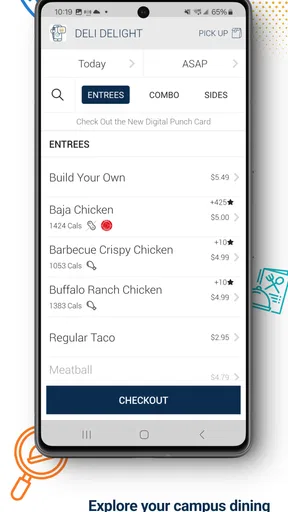
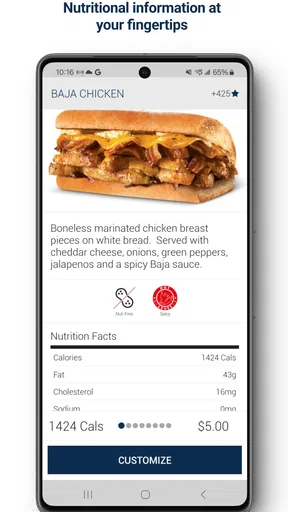
Transact Mobile Ordering is a campus-focused mobile ordering service that lets students and other authorized users browse participating dining locations, view available menus, customize items, and place orders from a phone. Depending on the institution’s setup, it may support pickup at a selected venue, scheduled ordering, account-based payments, and access to campus dining information. Available features can vary between schools.
How do I place an order with Transact Mobile Ordering?
After signing in, select your campus or institution and choose a participating dining location. Browse the menu, open an item to review options and modifiers, add it to your cart, and select an available pickup time or location if offered. Before confirming, carefully check quantities, customization choices, fees, and the payment method. The app should display an order confirmation after successful submission.
What payment methods does Transact Mobile Ordering support?
Payment options depend on the institution and how its Transact system has been configured. In many cases, orders can be paid using an associated campus account, meal plan funds, dining dollars, or another balance managed by the school. Some locations may also allow card or other digital payment methods. Review the checkout screen and your campus dining policies because accepted payment types, limits, and refunds may differ.
Can I change or cancel an order after submitting it?
Order changes and cancellations are usually limited once a restaurant or campus dining venue has accepted the request, particularly when preparation has already started. If the app displays a cancellation option, use it immediately and check whether a refund or balance adjustment is provided. For incorrect items, missed pickup times, duplicate charges, or unavailable products, contact the participating dining location or your institution’s Transact support team.
Why can’t I see a dining location, menu item, or ordering option in the app?
The available venues and menus are controlled by each participating institution, so not every campus dining location necessarily supports mobile ordering. A venue may also be hidden because it is closed, outside ordering hours, temporarily unavailable, sold out, or undergoing maintenance. Confirm that the correct campus is selected, update the app, and check your school’s dining schedule. If the problem continues, contact campus dining support.
